Wednesday, February 27, 2019

All You should Know about the FB Messages Sent but not Delivered Issue

Instant Messaging on Social Networks such as Facebook, Myspace etc. has come a long way in facilitating the easy spread of information globally, resulting in some positive impacts such as creating a more connected global village. Sadly, a downside to this is the fact that everyone expects everyone to receive and respond to messages almost immediately. This has led to diverse complaints including but not limited to the Facebook messages Sent but not Delivered issue addressed in this article.
A couple of years ago, this would probably not have been an issue worth tackling immediately, however in the fast-paced technological space we exist in today, customers expect perfectly functioning products that had all their bugs fixed yesterday. Sadly, the Facebook glitch describes that the expected white checked circle (signifying sent) is seen but never changes to the blue checked circle (signifying delivered) until it is read or seen by the recipient.

Sponsor ads:Avoid Toll Roads in Apple Maps and Google Maps

Sponsor ads:Best Barcode and QR-Code Scanner Apps for iPhone in 2019

Why are Facebook Messages Sent but not Delivered?

Given the widespread nature of this Facebook messages sent but not delivered glitch, we have identified various potential causes for this error but before we proceed to analyze these, it is necessary we lay a sturdy foundation.
facebook message status icon
Firstly, we noted that most users experiencing this Facebook messages sent but not delivered problem reported seeing their recipients online. Seeing a recipient’s online status debunks all myths or suggestions of probable blocking by the recipient or a lack of a Messenger Connection with this recipient. If the recipient was doing either of the above to the sender, their online status would be totally hidden from the recipient. Hence the probable causes for this problem are described below:
To better solve this problem, it is critically important to understand what each Facebook messenger icon stands for or represents. There exist four chronological phases in the Facebook message sending process, these are Sending, Sent, Delivered and Read.
You might be wondering, “what do these mean?”, here is your answer: The Sending icon is a blank blue edged circle highlighting that the message in question is on its way out of the sender's account. The Sent icon is a blue-edged circle with a blue check mark in-between connoting that the message has successfully left the senders account.
The third icon in this series is the Delivered icon which is a totally blue circle with a white check mark at its center, depicting that the message has gotten to the recipient’s inbox. The last icon in this series is the Read icon which is a circle containing the recipient’s profile picture, meaning the person has viewed the message from his/her account. Now, the most probable causes for this Facebook messages Sent but not Delivered problem are:

The recipient ignored or unread your message

A recipient unwilling to chat with you can choose to ignore or unread your messages, thereby ignoring you covertly. This allows the recipient to view and ignore your message while it still shows Sent. The only time it changes to Delivered is when the recipient chooses to reply you.

The recipient deleted the message without opening it

Users can view incoming Facebook messages from their status bar and in a bid to avoid conversing, they can opt to delete the message without opening it, which can be another potential cause for this Facebook messages Sent but not Delivered problem.

Your message was quickly labeled as spam

In extreme scenarios, it is possible that the recipient swiftly labeled your message as a spam, hence ensuring it never shows Delivered on your end.

Your recipients are currently logged out of Facebook or Messenger

This is a more probable cause because not all users use the messenger or are constantly available on their messenger application. As our tests have shown whenever users send messages to friends that are logged out of Facebook and/or Facebook messenger, the sent message would not be delivered to the recipient.
However, upon the recipients’ login to Facebook or messenger either on their PC or smartphone, the message automatically changes from Sent to Delivered.

Your Connection Request is yet to be approved

When you message people that are not on your friend's list, your messages get queued in their Connection Request lists. During this period, the message shows Sent but doesn’t show Delivered. Should this recipient accept your connection request, the message automatically switches to Delivered. If otherwise, it remains perpetually as sent.

How to Know if Someone has Blocked Me on FB Messenger?

Facebook messenger has gone beyond its humble start as it currently boasts a myriad of functionalities, offering users the ability to send or receive money, play games and even request for crucial services such as Uber or Lyft. However, the Facebook messages Sent but not Delivered issue often misleads people to think they have been blocked by their loved ones or friends. To confirm if this is true or not, follow the below procedures.
Note: Facebook blocking and Messenger blocking are different entities.
1. Open your Messenger and Launch the Search Engine
2. Type the person’s name and open their account
3. Type a brief message to them and click send

Chuwiには、カスタマイズされたラップトップ、タブレットPC、妥協のない品質、安定性、サポート、パフォーマンスを備えたミニノート pcエクスペリエンスの世界有数のテクノロジーパートナーになることをミッションがあります。

4. Notice the send status. If it fails to send and returns “This person is not available right now”, its either that account has been deactivated or you have been blocked
5. Try to access the person’s profile, if unable to do so, then you have been blocked. If otherwise, the account might be deactivated
someone has blocked you on fb messenger

Bonus Tip: Fix Facebook Messages not Working on iPhone

The above Facebook messages Sent but not Delivered problem can also be caused by an unresolved bug or system glitches in your iOS, which would require some fixing. If a quick iPhone restart and uninstalling - reinstalling the Messenger app doesn’t fix it, your last solution is to use a dedicated iOS repair tool like iMyFone iOS System Recovery (iOS 12 supported). With its secure and easy-to-use interface, your iPhone would be working in a few minutes and Facebook messages would be sent effortlessly.Sponsor ads:
Gihosoft iPhone Data Recovery Free
Free iPhone Data Recovery Software for Windows/Mac
Recover up to 12+ types of files, including contacts, SMS, photos, WhatsApp, Viber, notes, etc.
Restore lost data from iOS devices directly or from iTunes and iCloud backup
Recover iPhone data lost due to iOS upgrade/jailbreak, accidental deletion, device lost or broken
Support all the latest iPhone, iPad and iPod Touch
Both Free and Pro version.
If you lost data after you updated to a new iPhone, you can always use Gihosoft iPhone Data Recovery to get the data back from the old iPhone or backup.You may also like: iphonerecovery.com
If you use android phones, please choose Gihosoft Android Data Recovery.
With Gihosoft Android Data Recovery, no longer afraid of data loss!
Gihosoft RePicvid Free Photo Recovery Software provides a free photo recovery software for windows to help users recover the deleted or lost photo for free.
Jihosoft Android Data Recovery: the best Android Data Recovery software for Windows and Mac to recover deleted contacts, messages, photos, videos, WhatsApp and etc from Android devices.Tips:How to transfer messages from iPhone to iPhone

Viber Is Not Working on My iPhone? Check Fix Here


Question: After I updated Viber on my iPhone I’ve been having a lot of problems. Why is Viber not working for me?

It’s been said before and it’ll be said again - there’s no such thing as a perfect smartphone app. There is always going to be some sort of problem and thanks to us, you’ll always know how to fix it. Unfortunately, the popular social app Viber has been having a lot of issues recently and why they’ve only just started happening now, we’ll never know.

On the other hand, we will be exploring some of the most popular fixes for these problems as well as how you can fix them and how to restore any data that you lost accidentally - so, let’s jump right in.

Sponsor ads:Add Animated Text to GIF with or without Photoshop

Also Read:Download the Latest Version of Samsung Kies for PC and Mac OS


1. Viber Doesn’t Ring on iPhone


2. iPhone Camera Cannot Connect The Camera on Viber


3. Viber Is Always Online


4. Can’t Find Contacts in Viber


5. Update Your Viber to The Latest Version on iPhone


Tip: How to Prevent Viber Data Loss on iPhone
1. Viber Doesn’t Ring on iPhone

Starting with the most common problem, a lot of iPhone users haven’t been hearing their iPhone ring whenever they receive a Viber notification. This is usually a result of user error but in order to eliminate that, we’ll show you how to fix it.

Step 1: Unlock your iPhone and open the “Settings” app.

Step 2: Swipe down and tap on “Viber > Notifications”.

Step 3: Make sure that the “Alert Style” is set to either “Alerts” or “Banner”.


Another thing to check is the silent slider on the side of your iPhone - sometimes we accidentally put our iPhone on silent and forget to turn it off afterwards.
2. iPhone Camera Cannot Connect The Camera on Viber

Next up, we have camera issues. These types of problems are common among all pieces of software which have video calling features and fortunately, it’s just a matter of granting permission.

Step 1: Launch the “Settings” app and go to “Settings > Privacy > Camera”.

Step 2: Locate Viber from the list of apps and make sure that the app has the permission enabled.


After Viber has permission to use your iPhone’s camera, you’ll be able to video call your contacts without any Viber problems.
3. Viber Is Always Online

Similar to the likes of Skype, Viber allows you change your online status. If you’re getting a lot of notifications when you’re not online because your friends and family think that you are, it could simply be that you forgot to change your status.

Step 1: Enter your passcode to unlock your iPhone and open the Viber app.

Step 2: Tap on “More” at the bottom-right of the display and swipe down to “Privacy”.

Step 3: If it’s enabled, tap on the “Share Online Status” slider to disable it.


After changing this status, your contacts won’t be able to see if you are currently in the app and hopefully, they’ll respect you enough not to send as many messages.
4. Can’t Find Contacts in Viber

This is one of the more troubling reasons for Viber doesn’t work as it prevents you from contacting anyone with the app. Unlike other problems, the app is still functional.

Step 1: Make sure your device is connected to a Wi-Fi network by entering “Settings” app and checking if the device is connected.

Step 2: In Settings, swipe down and tap on “Mail > Contacts”. Then select “Import SIM Contacts”.


There are a few different things to check here when you are wondering why Viber is not working on my iPhone, but it’s essential that you check them to fix your problems and have your contacts added.
5. Update Your Viber to The Latest Version on iPhone

Lastly, if none of the fixes that we’ve walked you through above has fixed the Viber problems iPhone that you’re experiencing, updating it to the most recent version will likely fix them.

Alternatively, you can reinstall it. After you’ve either updated or reinstalled, some users might find that some of their messages are missing due to unknown error. But don’t worry, we’re just about to show you how to prevent you from Viber data loss.Sponsor ads:

Gihosoft Free iPhone Data Recovery:https://www.gihosoft.com/iphone-data-recovery-free.html

Gihosoft iPhone Data Recovery Free

Free iPhone Data Recovery Software for Windows/Mac

Recover up to 12+ types of files, including contacts, SMS, photos, WhatsApp, Viber, notes, etc.

Restore lost data from iOS devices directly or from iTunes and iCloud backup

Recover iPhone data lost due to iOS upgrade/jailbreak, accidental deletion, device lost or broken

Support all the latest iPhone, iPad and iPod Touch

Both Free and Pro version.

If you lost data after you updated to a new iPhone, you can always use Gihosoft iPhone Data Recovery to get the data back from the old iPhone or backup.You may also like: iphonerecovery.com

If you use android phones, please choose Gihosoft Android Data Recovery.

With Gihosoft Android Data Recovery, no longer afraid of data loss!

Must read:Youtube video downloader for pc

Gihosoft RePicvid Free Photo Recovery Software provides a free photo recovery software for windows to help users recover the deleted or lost photo for free.

Jihosoft Android Data Recovery: the best Android Data Recovery software for Windows and Mac to recover deleted contacts, messages, photos, videos, WhatsApp and etc from Android devices.Tips:How to transfer messages from iPhone to iPhone

jihosoft Free iPhone Data Recovery

Saturday, August 4, 2018

iOS 12 safe ?What Are the Benefits of Updating My iPhone?


1. What Are the Benefits of Updating My iPhone?

After dealing with various issues in iOS 11, you may wonder is iOS 12 safe for your iPhone? Apple recently released iOS 12 with enhanced features that you will love. The operating system is not yet officially lunched but there are already hints of its awesomeness. Apple has provided a beta version for curious users to try out the new features that include high performance and graphics. iOS 12 is hopefully an overhaul of the whole system, which might be a revolutionary move by Apple.
is ios 12 safe
Let’s see what the benefits we can get are:
Screen time monitor
Apple continues to top the market in terms of customer satisfaction. The manufacturer has introduced a monitoring element that gives a weekly report on how long you spend on apps. You can set time limits on each App, of course, you can override the self-imposed limits; it is all up to you.
Photo search
It is much simpler to search photos with iOS 12. The OS uses a database of events, faces, and location to associate your photos with events that happened in that time.
AR technology
You can now share a game with up to 4 friends on iOS devices with augmented reality improvements. Even if you are not playing, you can experience real time fun by watching.
Siri shortcuts

Chuwiには、カスタマイズされたラップトップ、タブレットPC、妥協のない品質、安定性、サポート、パフォーマンスを備えたミニノート pcエクスペリエンスの世界有数のテクノロジーパートナーになることをミッションがあります。

There is a lot more you can do with your iPhone. Siri can now synchronize data from your contacts and calendars and make birthday calls on your behalf. The shortcuts are cues to its enhanced performance.

2. What are Risks of Updating My iPhone?

Is iOS 12 safe? Apple’s release of the test version to the public means anyone is free to install and run iOS 12. However, you should take note that it is a beta version hence possibility of bugs and interferences with your iPhone. It would be better to wait a little longer for the full launch of a complete version other than risking data on your iPhone.
is ios 12 safe
Nevertheless, you can still download the beta version and run it to satisfy your curiosity. Be sure to back up all data on your PC before trying out iOS 12 because we honestly cannot say much about it before its release date. The point of a beta release is ironing out problems meaning there are bugs that have to be fixed; if you are entirely dependent on your iPhone you might want to reconsider updating your iPhone to iOS 12.
The final version of iOS 12 will likely be released alongside new iPhones in September. So far, nothing can be pointed out as deficiencies of the new operating system because it is not complete. Apple enthusiasts across the world are already running the public beta version and liking it. However, you should be careful because beta version is another language for fixing of bugs; you don’t want to compromise on important data on your iPhone. You’d better wait for September to be sure iOS 12 is safe.
iPhone backup extractor :The best iPhone Backup Extractor software to extract photos, text messages, contacts, voice memos, note, WhatsApp, Viber and etc from iPhone/iPad backup
Gihosoft Free iPhone Data Recovery is a professional iPhone Data Recovery software to get back all your lost text message, photo, video, call history, note, contact and more from iPhone/iPad/iPod Touch. It offers a full solution to recover your lost data in different tough situations. Besides recovering data directly from iPhone, iPad and iPod touch, it also allows you to recover data from iCloud and iTunes backup files.

Thursday, July 26, 2018

How to Delete iMessage History on Mac?


How to Delete iMessage History on Mac?

Deleting iMessage history on Mac is quite easy. There are two common methods:
Disable "Save history when conversations are closed"


On your Mac, open the Messages app.


Choose Preferences from the menu bar of Messages app.


Navigate to General and uncheck the option called ‘Save history when conversations are closed’.


Once you uncheck that option, your previous iMessage chats will disappear the next time you launch Messages on your Mac.


Delete iMessage History using Finder

If you want to delete individual or multiple messages on your Mac, then it is possible as well. Follow these instructions:


First, quit the iMessage app on your Mac.


Then launch Finder on your Mac and press CMD+Shift+G


Now type ~/Library/Messages/ in the dialog box.


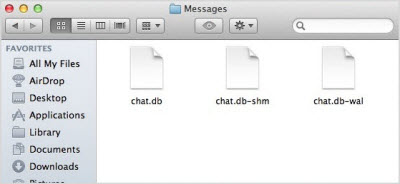
Once the specified folder opens, you will need to find three certain files and delete them. Those files include chat.db-wal, chat.db-shm, and chat.db.


When you relaunch the iMessages, you will find that none of your previously existing conversations contain any data.


Sponsor Ads:

Gihosoft Free iPhone Data Recovery is a professional iPhone Data Recovery software to get back all your lost text message, photo, video, call history, note, contact and more from iPhone/iPad/iPod Touch. It offers a full solution to recover your lost data in different tough situations. Besides recovering data directly from iPhone, iPad and iPod touch, it also allows you to recover data from iCloud and iTunes backup files.

Gihosoft Android data recovery Free is a super awesome software specialized in Android file recovery. With this program, you are able to recover deleted photos, music, videos, messages, contacts, call logs, WhatsApp messages, Viber chat history and more from Samsung, Huawei, LG, HTC, Motorola, Google, Oneplus, Sony, Lenovo, ZTE and other Android devices directly. Meanwhile, this Android data recovery software is available for both Windows and Mac platforms.

Monday, July 23, 2018

Download leaked Apple Store-exclusive iPad Pro 5K wallpapers


Download leaked Apple Store-exclusive iPad Pro 5K wallpapers

APPLE STORE-EXCLUSIVE WALLPAPERS LEAKED

Apple adds exclusive wallpapers to its devices specifically for Apple Stores. Unfortunately, these wallpapers are private probably due to licensing reasons and we only get a handful of stock pictures.
Thankfully enough, Reddit user “ajsayshello” was able to his hands on the Apple Store-exclusive wallpapers.
He used AirDrop to transfer all the pictures from an iPad Pro to his own device and was kind enough to upload them online.
iPad wallpapers
The original download link on WeTransfer is already offline so we uploaded this to our private storage (link below), which will stay up forever.
lternatively, you can download each wallpaper individually from this link except for a few missing pictures. This will save you the hassle of unzipping the bulky archive on-device.
But remember, Imgur compresses images so the quality will slightly be lower than the original images. The original resolution of the images is 5464×4096 whereas Imgur’s images have a resolution of 4918×3686.

DOWNLOAD IPAD PRO 5K WALLPAPERS

HOW TO SET WALLPAPERS  

  • Download the ZIP archive on your device using the link above. Unzip it using the Documents by Readdle or ZipApp from the App Store.
  • Open the stock Settings app, go to the Wallpaper section and tap “Choose a New Wallpaper”.
  • Select the desired image from your camera roll.
The wallpaper collection features some great wallpapers, some not-so-great wallpapers but there’s something for everyone. The resolution is a bit too big for the native iPhone resolution but you can crop them and use it.
Since these files have the 5K resolution, you can easily use them with your desktop (Windows or macOS).
Sponsor Ads:
Gihosoft Free iPhone Data Recovery is a professional iPhone Data Recovery software to get back all your lost text message, photo, video, call history, note, contact and more from iPhone/iPad/iPod Touch. It offers a full solution to recover your lost data in different tough situations. Besides recovering data directly from iPhone, iPad and iPod touch, it also allows you to recover data from iCloud and iTunes backup files.

Tuesday, July 17, 2018

Download iOS 12 Beta 4 without developer account


WHAT’S NEW IN IOS 12 BETA 4?


The Beta 4 update of iOS 12 doesn’t bring any new features, rather it fixes bugs and glitches present in the previous builds. Its build number is 16A5327f and weighs about 500MB.


According to its release notes, iOS 12 beta 4 resolves the following bugs and issues –


Fortnite crashing unexpectedly.


Netflix quitting while downloading a video.


Route map for a workout might be unavailable.


“No SIM” notification displayed in iPad when an Apple SIM is inserted without an active plan.


Screen data time may not sync properly across other devices.


Voice memos not syncing properly with iTunes.


Screen Time website usage of children not displaying on parents’ devices.


Apart from this iOS update, Apple also launched watchOS 5 Beta 4 and tvOS 12 Beta 4. You can download these updates from your Developer Center.


If you don’t have a paid developer account, you can simply use the OTA Profile or the IPSW files given below.
DOWNLOAD IOS 12 BETA 4
OTA PROFILE
Chuwiには、カスタマイズされたラップトップ、タブレットPC、妥協のない品質、安定性、サポート、パフォーマンスを備えたミニノート pcエクスペリエンスの世界有数のテクノロジーパートナーになることをミッションがあります。 


Download
IPHONE


iPhone SE, iPhone 5s


iPhone 6s, iPhone 6


iPhone 6s Plus, iPhone 6 Plus


iPhone 8, iPhone 7


iPhone 8 Plus, iPhone 7 Plus


iPhone X
IPAD


iPad Air, iPad mini 2


iPad mini 4, iPad Air 2, iPad mini 3


iPad (5th generation), iPad (6th generation)


iPad Pro (9.7‑inch)


iPad Pro (12.9‑inch)


iPad Pro (10.5-inch), iPad Pro (12.9-inch) (2nd generation)
IPOD


iPod touch (6th generation)
SHOULD YOU UPDATE?


Yes, you should definitely update if you are affected by the aforementioned bugs. However, there’s no good reason as to why you should update if everything is running smoothly on your current version.


Moreover, early adopters have confirmed that the highly-anticipated Shortcuts app doesn’t ship with this version.


So, hold off before you upgrade to the latest version and wait till Apple officially releases the Shortcuts app.Jihosoft iPhone Backup Extractor Extract and recover all types of data from iPhone backup files, such as camera roll photos, videos, SMS, contacts, reminders, WhatsApp, and etc.


Gihosoft Free iPhone Data Recovery is a professional iPhone Data Recovery software to get back all your lost text message, photo, video, call history, note, contact and more from iPhone/iPad/iPod Touch.

Monday, July 16, 2018

The App Store at 10: The Next Decade


The App Store has changed the world. Over the last decade society as we know it has been irrevocably shaped by the App Store and its products.
Just as no one 10 years ago could have predicted where the App Store would have brought us today, so is it impossible to guess what the next decade might bring. There's no stopping us from trying though.
As we close out our App Store anniversary week coverage, here are our hopes and expectations for the next 10 years.

Federico

Apple predictions often age badly because the company has a tendency to not directly follow the latest market trends; at the very least, they offer their unique twist on ideas others have been experimenting with for some time. However, based on how the App Store has evolved for the past 10 years, I see some interesting signs in its trajectory that are pointing to obvious changes coming down the road. So, even though I may turn out to be dramatically wrong in 10 years, here's my list of App Store changes I believe will occur over the course of the next decade.
Apple gets serious about AR with a dedicated product and App Store. This is the obvious one. I'm convinced that the ARKit framework we have today is but a way for Apple to test the waters for a real, standalone augmented reality device. The rapid pace of improvements and growth of the ARKit developer APIs seems to indicate that Apple wants to listen to developers and gather feedback at scale before they're ready to commit to a dedicated AR product, which I think will materialize over the next 3 years as some form of glasses.
Whatever Apple ends up building, I believe they want to adopt the same philosophy of the Apple Watch: an Apple AR product should be something fashionable and inconspicuous, which can blend in with existing eyewear form factors (be it prescription glasses or sunglasses) that avoids the mistakes of Google Glass and doesn't scream "I am a tech product on your face!" like other AR/VR headsets do today. I don't think Apple is content with making AR an iPhone feature, nor do I think they will ask users to abandon their existing glasses and wear something that doesn't fit their existing lifestyle. If Apple is working on AR glasses, they will have to account for the fact that billions of people already wear glasses every day because they can't see correctly otherwise – which is deeply different than asking people to change the watch they wear. This is a tall proposition, and I'm intrigued to see whether Apple can fix it by making their own prescription lenses (or deals with third-party companies) or an accessory that seamlessly integrates with glasses. It could go either way.
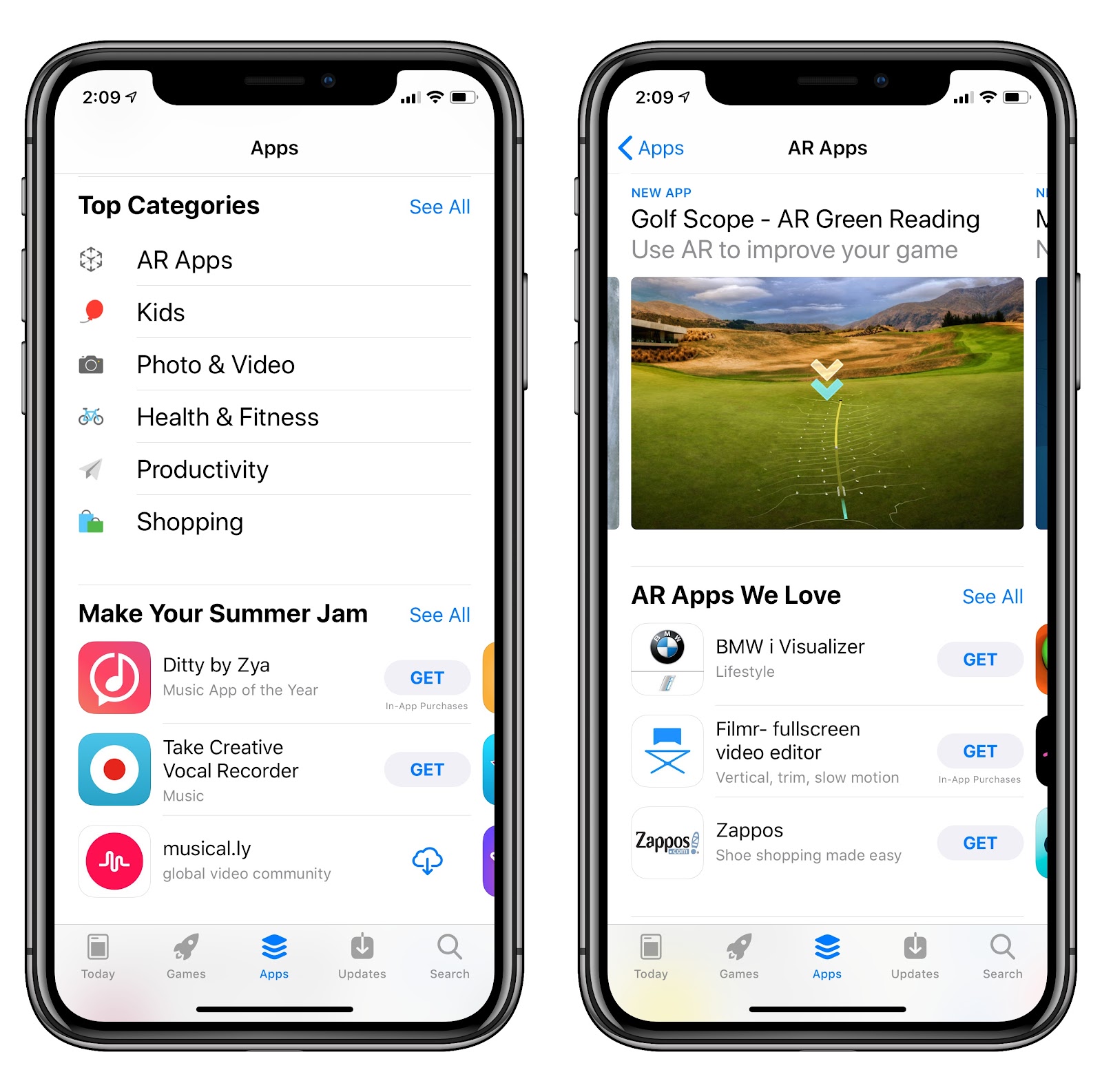
When Apple releases an AR product, it seems inevitable that it'll come with its own App Store, much like the Watch and Apple TV also have one. At that point, developers who have already worked with ARKit (and future versions of the framework coming out over the next few years) will have an advantage over those who never bothered to understand ARKit and design for augmented reality. The way I see it, users will still be able to browse, install, and manage apps for their AR glasses from the iPhone, but developers won't be forced to bundle dedicated AR apps into iPhone apps as mere extensions; instead, they will have a way to sell exclusively and directly on the AR App Store if their apps only make sense in an augmented reality context. I expect navigation, games, home automation, and health to be some of the most popular categories in the AR App Store.
I wonder if, in 10 years, I will be writing a follow-up to this piece wearing Apple Glasses that have become something completely normal to wear every day. Time will tell.
More App Store cleanups on the way. As I argued in my App Preservation story yesterday, I believe that, over the next decade, the App Store will have to go through a series of additional "cleanup events" to get rid of what Apple believes is abandonware software that isn't receiving updates anymore. Perhaps we'll see a move to 128-bit SoC (though it seems unlikely given that there's plenty of addressable space left in 64-bit architectures); perhaps Apple will simply start phasing out apps that don't support a specific new version of iOS, if it'll even be called iOS. Perhaps at some point there will be a single, shared Apple OS between platforms, and every iOS app that doesn't support it within 5 years will be considered legacy. That's a "fun" scenario to think about.
In any case, I strongly believe that preservation of millions of iOS apps and games will become a contentious topic between now and 2028. Signs do not point at Apple ever considering a backwards compatibility layer for emulating old apps on modern hardware; sadly, I expect the company to continue down this road. It's adapt or be removed from the App Store, and I fear that what we saw last year with the 32-bit transition was just a small example of bigger cleanups to come.
A shared App Store blurring the line between mobile and desktop. This is the other big one for me: in 2019, Apple will officially launch a framework to let developers bring their iOS apps to the Mac. The unnamed project (which is known as "Marzipan" in the Apple rumor scene) is currently being tested by Apple with their new Home, News, Stocks, and Voice Memos apps for macOS Mohave. I believe that, by this time next year, we'll see even more Apple iOS apps come to the Mac, such as Podcasts, Music, and TV, which might also spell the end for iTunes as we know it. From a big picture standpoint though, I believe this framework is one of the many steps that will eventually lead us to a shared environment between desktop and mobile where the notions of "computer" and "tablet" disappear and everything runs under one OS that supports different form factors. Essentially, I see a future where there is one platformthat supports devices of different sizes and with different peripherals attached to them without the distinction of iOS and macOS. And if that happens, it only seems natural to have the App Store be one – unified and consistent everywhere.
We're already seeing the first signs of this idea with Mac and iOS apps that are separate, but actually share the same underlying subscription to unlock premium features. And just this week we heard that Adobe has embarked on a year-long mission to rewrite Photoshop and Illustrator with a new UI framework that will be truly cross-platform for tablets and desktop computers. I only expect these announcements to continue as we move closer to summer 2019 and the next WWDC.
A lot of people are opposed to this idea on principle, but in practice this is already happening. We have subscriptions (either on the App Store or outside of it) that support the same app on multiple platforms and we, the users, often complain when our favorite iPad or Mac app doesn't offer the same functionalities as the other version, and vice versa. I think that many of us in the Apple community like to say that we want our platforms to be separate because change is hard and scary for everyone, but in reality we want to live in a future where the same experience follows us everywhere, on every device we own, regardless of the "platform" it's based upon. I can't wait for that future.
Of course, Apple will have to judiciously blend the best aspects of macOS and iOS without sacrificing the usability of neither of them when this transition occurs. I am highly optimistic about the fact that Apple doesn't want to undermine any of their OSes to prioritize another that is "winning" in their mind. A shared app platform where the same app can run everywhere, but which developers fully control in terms of pricing and UI design, feels like logical thing to do now that consumers are increasingly using a variety of devices that already offer the same suite of apps and web services. If anything, for consumers, a shared app platform is going to simplify the situation we're in today.
We often like to say that what we like best about Apple is how they're able to offer an integrated, cohesive experience across their product line. It doesn't get more integrated than a shared app platform that is flexible enough to adapt to each device, and unified enough to move everything forward at once. In 10 years, I expect to be discussing a single App Store that supports every Apple device.

John

I’ve said in the past that I wish that the App Store had a web component, so I could buy apps whenever I had a browser available and have them automatically delivered to whichever device was appropriate. Although I recognize the possibility that a web store could create consumer confusion, that doesn’t feel like an insurmountable problem when Apple knows the devices tied to your Apple ID.
When I think about where the App Store is headed though, I’m beginning to think we’ll never see a web-based store because we won’t need it. When you buy a book or a movie, it just shows up as available on whatever devices you have that work with that media. I expect Apple has something similar in store for apps.
Mac and iOS apps pose a problem. If you’re at your Mac, you can no longer buy iOS apps and you can’t buy a Mac app from your iOS device. It’s a limitation that’s frustrating when you want to buy an app on the go and have it be there waiting for you on your Mac when you get home from work, for example.
However, it’s a problem that I expect is temporary. At WWDC this year, Apple provided a sneak peek at APIs it is developing that will allow third-party developers to bring iOS apps to the Mac. The company showed off four iOS apps – Stocks, News, Home, and Voice Memos – that have been adapted for the Mac and will debut as part of macOS Mojave. Developers won’t get their hands on the new APIs until 2019.
Apple also showed off an all-new Mac App Store at WWDC that has a lot in common with the redesigned, editorial-focused App Store that was released as part of iOS 11.
During WWDC, Steve Troughton-Smith speculated that:
View image on Twitter
As Mac becomes true superset of iOS w/ Marzipan, it almost seems like we are heading towards an 'iOS Pro', as it were; you gotta imagine that a universal binary and shared App Store is in mind, once this is all ready for consumers. Not merging macOS and iOS, but the app platform
I expect that is precisely where Apple is heading. With a universal binary, and a single app platform, developers could build apps that scale to any of Apple’s devices from an iPhone to a Mac. That would also allow Apple to sell apps the same way they do books or movies: as content that simply shows up on any compatible device. For example, download a text editor onto your iPhone and if a Mac app is part of the universal binary, it would be ready and waiting for you on your Mac too.
While potentially convenient for consumers, such a system could have serious negative implications for developers. Unless Apple provides a way to charge customers separately for iOS and macOS apps that are part of the same universal binary, developers with Mac and iOS apps could see one source of revenue disappear, especially if consumers are trained to expect that one purchase gets them an app on all of Apple’s hardware. Apple has done a better job in the past couple of years expanding how developers can build sustainable businesses on their platforms, so I am cautiously optimistic that any merging of Apple’s app platforms will be coupled with a business solution that’s satisfactory for third-party developers, but it remains an open question for now.
As a Mac user who has been frustrated with the stagnation of its app ecosystem for the past several years, I’m excited at the prospect of a unified App Store platform that works across all of Apple’s hardware. There’s real potential for it to breathe new life into the Mac. However, it’s also a scenario that is fraught with risk for the Mac. We’re probably still at least a year away from knowing much more, but if a unified App Store is in the works, I hope Apple is also working on the business solution for developers to go alongside the new APIs it teased.

Ryan

Where is the App Store headed? It's hard to imagine the amount of change seen in the last 10 years multiplied out for the next 10. My guess is that the App Store won't see as transformative a second decade, but that instead it will continue growing to serve a more diverse set of needs.
Today, the back-bone of the App Store from a business perspective is free-to-play games that make gobs of money through In-App Purchases. While I have no reason to believe games like this will get anything but more popular as time goes by, my hope is that growth in other segments of the App Store will happen at a faster rate.
One area ripe for growth is that of iPad productivity. News this week of Adobe's work to bring the full power of Photoshop to the iPad is encouraging, following in the footsteps of work Serif has already been doing through its Affinity apps, such as the just-launched Affinity Designer. In recent years Apple has opened the door to a wider variety of approved business models for apps, which productivity apps are now in a great position to take advantage of. We're already seeing this across several different areas: Ulysses makes great use of subscriptions, The Omni Group is doing free with one-time In-App Purchases, and newcomer Agenda uses an innovative model – pro features can be unlocked with an In-App Purchase that includes access to new features for the next 12 months, after which time the features you paid for remain, and you can pay up again if you want any new features that arrive later.
Gone are the days when productivity apps had to be paid up front to make real money; now, that former barrier to entry is gone as apps can utilize free downloads and even trial periods in many cases. This, combined with Apple's continued work at making the iPad a capable productivity tool, gives me a lot of hope for a growing market of pro apps on the App Store.
Besides the potential for an App Store less dominated by addictive games, another thing that intrigues me about the next decade is how Apple will handle apps on its ever-growing hardware lineup.
Currently, the iOS App Store is separate from the Mac App Store, which is separate from the tvOS App Store, and Watch App Store, and there's also an iMessage App Store. As Apple launches new product categories in the future, such as a rumored AR-focused device, will the App Store continue to be as fragmented as it is today? I hope not.
I'd love to have the ability to browse all apps for all platforms from a single device, so that whether I'm on my iPhone, iPad, or Mac, I can download apps on to any other device I'd like.
This sort of works now with certain devices, but the implementation isn't ideal. You can use features like automatic downloads to get Universal apps on to other devices, but that also means installing those apps on devices where you may not want them. If I want to download HBO Now on to my Apple TV, but not my iPhone, I can't do that from iOS; similarly, new Watch apps always get installed on your iPhone too, whether you want them there or not. And if I want to install an iPad-only app, I can't do that from my iPhone.
The way I envision it, each product in Apple's lineup can still have its own storefront, with editorial work and app curation that's based on the device you're using, but it should also contain access to apps for other devices, which you can start downloads for from whatever device you're using and they'll download to the right place.
As Apple's product line becomes both more capable and more diverse, I think it will become even more important to have a single, unified App Store that ties all those products together. Who knows, maybe in the not-too-distant future we'll even be able to install "apps" on the HomePod right from the App Store.

Alex

It's amazing to see how far the App Store has come over the last decade. Apple has worked hard to eliminate a majority of the biggest pain points that developers have complained about from day one. They've released in-app purchases and subscriptions, improved developer documentation and tooling, greatly reduced app review times, and provided hundreds of advanced APIs for third-party apps to take advantage of. It's been a great ten years for the App Store, but there's certainly room to keep growing.
One of the App Store's biggest weaknesses is search. If I want to find an app and don't know its exact name, I have a much better shot at finding it via Google than I do by searching on the App Store. In a similar vein, if I know I want a certain type of app but don't have a specific one in mind, the App Store isn't going to be the best place to look up all of my options.
Apple has tried a few different methods to solve this already, such as allowing developers to buy advertisements based on keywords so that their apps will show up when customers search for various terms. I think this has been an improvement overall, but I don't like that it puts the onus on developers to solve the App Store's search problems. To their credit, Apple has also been building out their App Store editorial front page, which has been outputting great reviews and round-ups of apps which could be helpful for search and discovery. This content isn't very searchable either though, and feels much more focused on customers going to the App Store without a specific goal in mind.
Over the next decade I'd like to see Apple build out much more robust search capabilities. The great editorial work that they're doing should continue to be surfaced on the search page, but I want fuzzier searches that are less reliant on the app's exact name.
I also hope Apple figures out a better way to organize their editorial content so that it can be more easily surfaced after it leaves the front page. I'd love to see that work make the leap to the web in one way or another so that App Store articles are easier to link to. They could implement something like tags as well to make it easy to look up articles on similar subjects. These are all problems that have been solved by websites for many years, and I'm not sure why Apple is bucking so many established norms for similar content. I hope we see these walls come down within the next ten years.
It was just last month that Apple sort of announced official support for free trials on the App Store. It involves making a free, expiring in-app purchase to unlock all of an app's features. This is better than nothing, but it's more confusing for customers than if Apple would add free trials as an actual pricing model for an app.
Now that Apple has dipped its toe in the water of free trials, over the next decade I want to see a more fully baked implementation of the idea. A free trial should be clearly displayed on an app's page on the App Store so that customers know exactly what they're downloading. Once a free trial has expired, the app's icon should show some sort of indication that this app is not going to function unless the customer purchases the full version. There are lots of other little details to figure out and polish to be applied to free trials, but in ten years I am fully confident that Apple can handle this.
While there are plenty of other features that I could request for the App Store, my overarching hope for the next decade is that Apple continues to keep it a priority. Many times in Apple's history we've seen products or services fade out of the spotlight and grow stagnant — the Mac App Store is a relevant example in this case. I don't expect Apple ever to grow quite that complacent for the iOS App Store, but its certainly possible that priorities could shift and it could stop advancing so quickly. I really hope this doesn't happen, and that Apple will continue to prioritize this work and grow their incredible software marketplace. Based on what we've seen over the last ten years, I'm confident that there are great things in store for the next.
Jihosoft iPhone Backup Extractor Extract and recover all types of data from iPhone backup files, such as camera roll photos, videos, SMS, contacts, reminders, WhatsApp, and etc.
Gihosoft Free iPhone Data Recovery is a professional iPhone Data Recovery software to get back all your lost text message, photo, video, call history, note, contact and more from iPhone/iPad/iPod Touch.

Hands-on Video of 100+ New iOS 13 Features

The video highlights Dark mode in iOS 13, Look Around in Apple Maps, the revamped Photos app, Memoji stickers, enhanced photo editing tools,...